


Televista
3.773.00 Reviews
App Specs
- Version
- 1.1.9
- Updated On
- License
- Free
- Downloads
- 50,000+
- Developer
- DEVXDA
- Categories
- Tools
- Platform
- Android
Screenshots


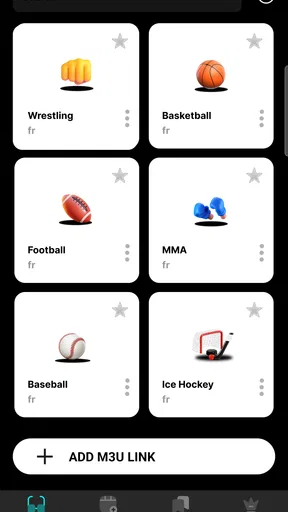
 Analysis by AppCompare
I approach Televista first as a media player: the useful question is whether it helps me get from “I want to watch something” to a comfortable viewing session without adding unnecessary fuss. That focus matters more than a long list of supposed extras. If you want a straightforward place to play media, it may be worth a look; if you expect a complete streaming service with a guaranteed catalogue, it is better to check your expectations before making it part of your routine.
What a media player does well
A player’s basic job is to make watching feel simple: choose something, start playback, and stay focused on the content rather than the controls. In that role, Televista’s appeal is practical rather than flashy. I would judge it by how easily it fits into the way you already watch, not by treating it as a replacement for every entertainment app on your phone.
That distinction is useful when deciding what to install. A media player is not automatically the same thing as a subscription streaming platform or a channel guide. I would not assume that one app supplies every film or show I might want. Instead, I’d consider whether Televista suits the media and viewing habits I already have, and whether its playback experience feels comfortable on my device.
Making it part of a normal viewing routine
For a sensible first test, I’d open the app when I have time to watch a short piece of media, rather than relying on it immediately for an important evening. That gives me a chance to see whether navigation and playback suit me, and whether the controls feel easy to reach while holding my phone. A few minutes of ordinary use can answer more than a quick glance at the app’s name or category.
It also helps to try the same routine I’d use on a typical day: decide what I want to watch, find it, start playback, then pause and resume once. Those small actions reveal whether an app fits into a real viewing habit. I’d pay attention to how quickly I can return to the video after a distraction, since phone viewing often involves interruptions rather than a perfectly uninterrupted movie night.
When it could be a useful choice
A realistic use case is a quiet break at home, when I want to watch media on my phone without turning the search into a project. Televista may suit someone who values having a player available and prefers to test an app directly instead of relying on assumptions about what it can do. It could also make sense as an option to compare with the player already installed on a device.
For a fair comparison, I’d use the same media and device with Televista and the built-in player, then consider which one gets me to playback with less friction. The default option may remain the better choice if it already handles my files and controls comfortably. A separate app earns its place only if I notice a practical difference in my own routine—not simply because it is another option in the app store.
Worth Reading Before You Choose

EA SPORTS FC Mobile 26 Is a Bigger Football Game, but It Takes Time

Flipboard Shows What News Apps Must Do Beyond the Feed

Switching to Android Auto Means Rethinking Your Driving Routine

Google Calendar Makes a Crowded Week Easier to Manage

Ludo King Makes the Most of the Minutes Between Plans

Baby Panda World Brings Quick Play to Modern Phones, but Its Game Library Feels Busy
Costs, expectations, and sensible boundaries
Televista is free to install, while offering in-app purchases that range from $6.99 to $129.99 per item. I’d check the purchase details in the app before spending anything and decide whether the value is clear for the way I plan to use it. The wide gap between those amounts is a good reason to avoid tapping through a purchase without first understanding what it covers.
The app is made by DEVXDA, is rated for Teen users, and has a 3.5 average from around 136 ratings, with roughly 48 written reviews. It has passed 50,000 installs. Those figures offer context, not a promise that it will suit everyone; I’d still make my own judgement after trying it. Its current version is 1.1.4, and it requires Android 6.0 or later, which is worth checking before installing on an older device.
Who is most likely to benefit?
I’d consider Televista if I’m looking for a media player and am willing to try it with my everyday viewing rather than expecting it to replace a streaming subscription, a television guide, or a social watch-party service. If I mainly want the simplest possible playback and my phone’s built-in option already does the job, there may be little reason to switch. If I need a specific catalogue or a particular viewing feature, I’d choose an app that clearly meets that need instead.
My practical advice is to start with a low-stakes viewing session, compare the experience with the player you already use, and only then decide whether Televista deserves a regular place on your phone. That keeps the decision grounded in what matters: whether the app makes watching your media more convenient for you.
Ever found yourself endlessly scrolling through channels without finding anything interesting to watch? Enter Televista, the app that's here to change how we experience television. I’ve spent some quality time with this app, and I’m pretty excited to share my thoughts with you. So grab some popcorn and settle in!
Your New TV Companion
Let me tell you, Televista feels like a game changer. It’s like having a TV guide, a streaming service, and a social network all wrapped up in one neat little package. The app is available on both Android and iOS, making it super accessible no matter what device you’re using. All you need to do is download it from the App Store or Google Play, and you’re good to go.
First Impressions
From the moment I opened the app, I was impressed by its sleek and intuitive interface. Everything is laid out in a way that just makes sense, which is a refreshing change from some of the cluttered TV apps I’ve used in the past. The home screen gives you a quick overview of what’s trending, new releases, and even a section for personalized recommendations based on what you’ve watched before. It’s like the app knows you better than you know yourself!
Features That Stand Out
What makes Televista really shine are its unique features. First off, the ability to create a watchlist is a lifesaver. I often find myself overwhelmed by choices, but with a dedicated list, I can easily keep track of shows and movies I plan to watch. Plus, the app sends reminders for upcoming episodes, so you’ll never miss the latest drama or action-packed scene.
Another standout feature is the integrated social aspect. You can follow friends and see what they’re watching, share your thoughts on a show, or even join a live chat while watching. It’s like having a virtual watch party, and I absolutely love it. It’s these little touches that make the experience feel more interactive and engaging.
Content Galore
Televista boasts a vast library of content, ranging from classic films to the latest TV series. Whether you’re in the mood for a romantic comedy, a spine-chilling thriller, or a heartwarming documentary, you’ll find it here. The search function is super responsive, and I appreciate the various filters that help narrow down my options. It makes finding something to watch a breeze.
Performance and Usability
I’ve tested the app on both Android and iOS, and the performance is consistently smooth. The video playback is crisp, with no buffering issues, which is a huge plus. Navigating through the app is seamless, and the loading times are impressively quick. It’s clear that the developers have put a lot of thought into ensuring a top-notch user experience.
Areas for Improvement
While Televista is pretty fantastic, there are a few areas where it could improve. For instance, the app could benefit from more language options for subtitles. Although it covers major languages, adding more would make it even more inclusive. Additionally, a feature to download content for offline viewing would be a great addition for those times you don’t have internet access.
Final Thoughts
Overall, Televista is a must-have app for anyone who loves TV and movies. It’s packed with features that make watching content more enjoyable and interactive. While there’s a bit of room for improvement, the current offering is more than enough to keep you entertained for hours. So if you’re looking for a fresh way to enjoy your favorite shows, give Televista a try. You won’t be disappointed!
Pros
- User-friendly interface enhances navigation.
- Wide range of channels available.
- High-quality streaming with minimal buffering.
- Customizable watchlist for easy access.
- Regular updates with new content.
Cons
- Limited offline viewing options.
- Some channels require additional fees.
- Occasional ads can be intrusive.
- No parental control features.
- Limited support for older devices.
FAQs for Televista
What is Televista and what does it offer?
Televista is a comprehensive streaming app that provides users with access to a wide range of TV shows, movies, and live channels. It offers a user-friendly interface, personalized recommendations, and high-quality streaming options, making it a versatile choice for entertainment enthusiasts seeking diverse content in one place.
Is Televista available for both Android and iOS devices?
Yes, Televista is available for both Android and iOS platforms. Users can download the app from the Google Play Store for Android devices and the Apple App Store for iOS devices, ensuring compatibility across a wide range of smartphones and tablets.
Does Televista require a subscription, and what are the pricing options?
Televista offers both free and premium subscription options. The free version includes limited content with ads, while the premium subscription provides ad-free access to a larger library of content. Subscription plans vary, allowing users to choose monthly or annual billing based on their preferences.
What are the key features of Televista that enhance user experience?
Televista includes features such as personalized content recommendations, offline viewing, multi-device syncing, and parental controls. These features are designed to enhance user experience by providing convenience, customization, and security, making the app suitable for individual users and families alike.
How does Televista ensure the quality and legality of its content?
Televista partners with reputable content providers to offer high-quality and legally licensed content. The app regularly updates its library to include new releases and popular shows while ensuring that all content complies with copyright laws, providing users with a safe and legal streaming experience.


